Lovelace Card
IntelliKeep ships with a dashboard card that shows how many tasks are overdue and due today, lists the most urgent open tasks with a checkbox to complete them, and links to the panel.
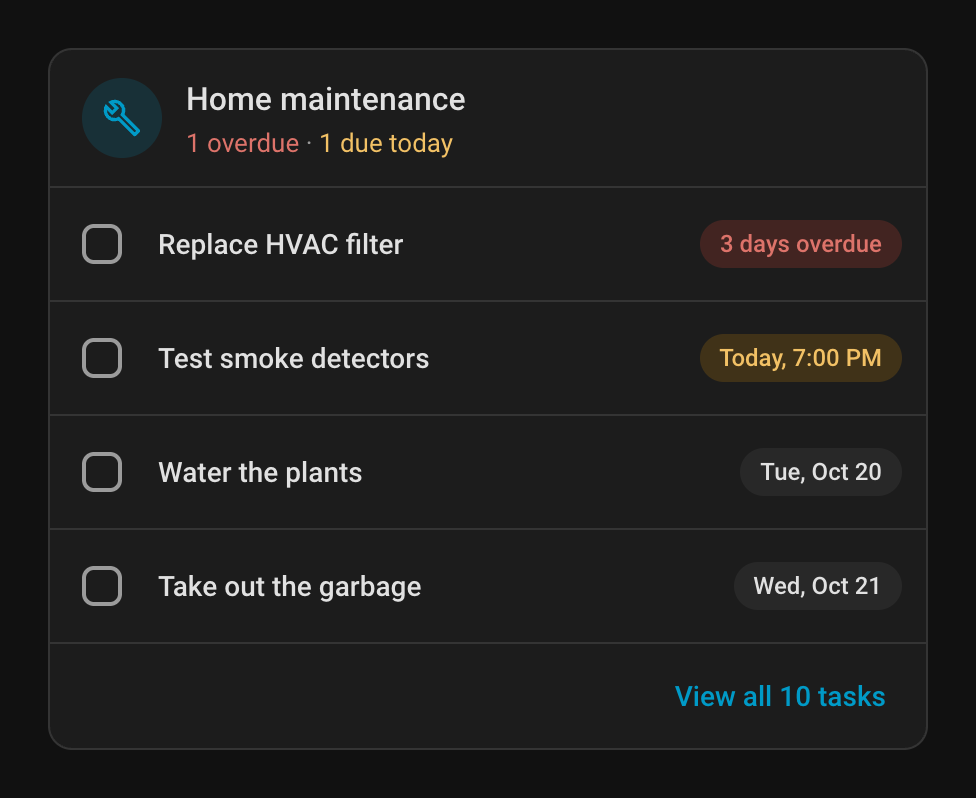
Adding the card
On a dashboard, click Add card and pick IntelliKeep Card. You can set its options in the visual editor, or add it in YAML:
type: custom:intellikeep-card
title: Home maintenance
max_tasks: 3
show_description: false
show_linked_entities: false
The card follows the language of your Home Assistant profile (English, Portuguese or Spanish).
Configuration options
| Option | Type | Default | Description |
|---|---|---|---|
title | string | "Home maintenance", in your language | Card title |
max_tasks | number | 3 | How many tasks to list (1–50) |
show_description | boolean | false | Show each task's description under its name |
show_linked_entities | boolean | false | Show the areas and devices each task is linked to |
filter_priority | list | all | YAML only. List only these priorities, e.g. [critical, high] |
filter_status | list | open tasks | YAML only. List only these statuses: pending, due, overdue, completed |
For example, a card for urgent work only:
type: custom:intellikeep-card
title: Urgent
max_tasks: 5
filter_priority: [critical, high]
filter_status: [due, overdue]
What the card shows
- Header: the title and a summary such as 1 overdue · 1 due today, or how many tasks are open when none is urgent
- Tasks: the open tasks, the nearest due date first, then by priority. Each one has a checkbox and the same due chip as the panel (3 days overdue, Today, 7:00 PM, Wed, Oct 21)
- Footer: View all N tasks opens the IntelliKeep panel
Ticking a checkbox completes the task, recording the Home Assistant user who did it, and shows a message with Undo.
YAML-mode dashboards
IntelliKeep registers the card resource automatically when dashboards are managed from the UI (storage mode, the default). If your dashboards are configured in YAML, add the resource yourself:
lovelace:
  resources:
    - url: /intellikeep_static/intellikeep-card.js
      type: module
Without it, the dashboard shows Custom element doesn't exist: intellikeep-card.
:::note Changed in 2.0
The card used to list 10 tasks and include completed ones. To get that back, set max_tasks: 10 and filter_status: [pending, due, overdue, completed]. See Upgrading from 1.x.
:::